
Running a modern business involves many repetitive tasks such as data entry, sending emails, updating records, managing projects, and coordinating with team members. These tasks can consume valuable time and reduce productivity if handled manually.
Workflow automation tools help businesses automate routine processes by connecting apps, organizing tasks, and executing workflows automatically. Instead of performing the same task repeatedly, businesses can create automated systems that handle these operations efficiently.
Automation helps organizations streamline operations, reduce human errors, and improve overall productivity. Many workflow automation platforms also offer free plans or trial versions, making them accessible for startups, small businesses, and freelancers.
In this guide, we will explore some of the best workflow automation tools that businesses can use to improve efficiency and manage workflows effectively.
Why Workflow Automation is Important for Businesses
Workflow automation plays a key role in modern business operations. It helps organizations operate more efficiently while reducing manual work.
Reducing Repetitive Manual Tasks
Automation tools eliminate repetitive activities such as sending notifications, updating records, and transferring data between applications.
Improving Team Productivity
When repetitive tasks are automated, teams can focus on high-value activities like strategy, innovation, and customer service.
Faster Business Operations
Automation speeds up processes by executing tasks instantly without manual intervention.
Better Collaboration Between Teams
Workflow automation tools allow teams to collaborate more effectively by organizing tasks and providing clear workflows.
Fewer Human Errors
Manual processes often lead to mistakes. Automation reduces the chances of errors by following predefined rules.
Improved Data Management
Automation tools help maintain consistent data flow across different systems and applications.
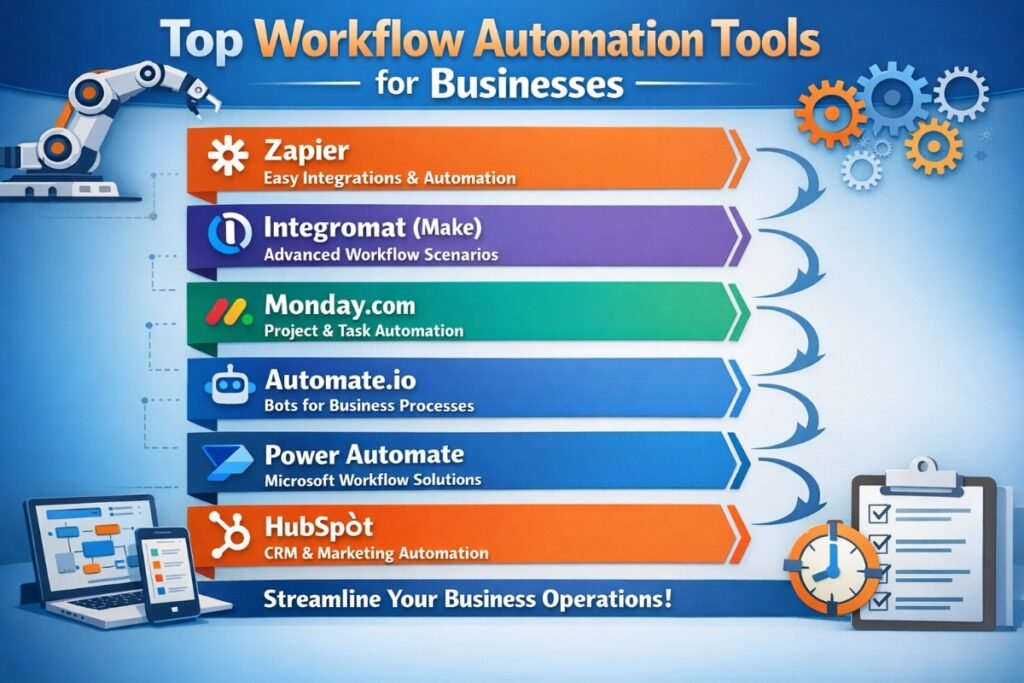
Top Workflow Automation Tools for Businesses
Zapier
Overview
Zapier is one of the most popular workflow automation tools that connects thousands of apps and automates tasks between them.
Key Features
- Integration with thousands of apps
- No-code automation setup
- Workflow automation using triggers and actions
- Task scheduling
Why Businesses Should Use It
Zapier allows businesses to automate workflows between different applications without technical knowledge.
Pricing
Free plan available with limited tasks.
Make (Integromat)
Overview
Make is a powerful automation platform that enables users to build complex workflows using a visual interface.
Key Features
- Visual workflow builder
- App integrations
- Advanced automation logic
- Data transformation tools
Why Businesses Should Use It
It allows businesses to automate complex workflows across multiple platforms.
Pricing
Free plan available.
Microsoft Power Automate
Overview
Microsoft Power Automate helps automate workflows between Microsoft services and other business applications.
Key Features
- Integration with Microsoft ecosystem
- Automated workflows
- AI-powered automation
- Cloud-based process automation
Why Businesses Should Use It
It is ideal for businesses using Microsoft products like Office 365 and Teams.
Monday.com
Overview
Monday.com is a project management and workflow automation platform designed to help teams manage tasks and automate processes.
Key Features
- Project workflow automation
- Task management
- Team collaboration tools
- Custom automation rules
Why Businesses Should Use It
It helps teams organize projects and automate repetitive workflow steps.
ClickUp
Overview
ClickUp is an all-in-one productivity platform that combines task management, automation, and collaboration features.
Key Features
- Task automation
- Project tracking
- Team collaboration
- Custom workflow automation
Why Businesses Should Use It
ClickUp helps teams manage tasks and automate business processes within one platform.
Airtable Automations
Overview
Airtable combines spreadsheet functionality with database capabilities and automation features.
Key Features
- Database automation
- Custom workflows
- App integrations
- Collaboration tools
Why Businesses Should Use It
It allows teams to organize data and automate workflows easily.
Workflow Automation Tools for Small Businesses
Trello Automation (Butler)
Overview
Trello includes a built-in automation tool called Butler that helps automate project management tasks.
- Task automation
- Workflow rules
- Board automation
Small businesses can automate task assignments, notifications, and project workflows.
Notion Automations
Overview
Notion provides automation features that help manage projects, databases, and workflows.
- Task automation
- Workflow templates
- Team collaboration
Zoho Flow
Overview
Zoho Flow helps businesses connect apps and automate workflows between them.
- App integrations
- Workflow automation
- Custom triggers
How to Choose the Right Workflow Automation Tool
- Budget: Choose tools that fit your business budget.
- Ease of Use: Beginner-friendly platforms reduce the learning curve.
- Integration: Ensure the tool integrates with your existing software.
- Scalability: Select tools that can grow with your business.
- Business Requirements: Choose tools that match your workflow needs.
Best Free Workflow Automation Tools
- Zapier Free Plan
- Make Free Plan
- Trello Automation
- Notion Free Plan
Tips for Implementing Workflow Automation
- Start with simple workflows
- Identify repetitive tasks
- Monitor automation performance
- Test workflows before full implementation
Conclusion
Workflow automation tools help businesses streamline operations, reduce manual work, and improve productivity. By automating repetitive tasks and connecting different applications, companies can operate more efficiently and focus on growth.
Businesses should begin with simple automation processes and gradually expand their workflows as they become more comfortable with automation tools.
FAQs About Workflow Automation Tools
1. What are workflow automation tools?
Workflow automation tools are platforms that automate repetitive tasks and processes within business operations.
2. Why do businesses use workflow automation?
Automation helps improve productivity, reduce errors, and streamline operations.
3. Are workflow automation tools free?
Many platforms offer free plans with limited features.
4. What is Zapier used for?
Zapier connects different apps and automates workflows between them.
5. Can small businesses use automation tools?
Yes, automation tools help small businesses manage tasks efficiently.
6. What tasks can be automated?
Tasks such as data transfer, email notifications, project updates, and app integrations.
7. Is automation difficult to implement?
Most modern tools offer no-code interfaces that make automation easy.
8. What is the benefit of workflow automation?
It improves efficiency and reduces manual work.
9. How do automation tools improve collaboration?
They organize workflows and ensure tasks are completed automatically.
10. Which automation tool is best for beginners?
Zapier and Trello automation are beginner-friendly options.